v1.29.0Connect Snowflake and schedule warehouses to cut idle spend.
Your cloud advisor showed you 14%. The other 86% is where the savings live.
450+ rules across AWS, GCP, and Azure. Read-only in five minutes. Every finding is reconciled against your actual bill before it reaches your dashboard.
FMCG enterprises
5 of 20
India's top 20 FMCG enterprises
cloud spend
$15M+
under management
teams
154+
on the platform
audit rules
450+
across AWS, GCP, Azure
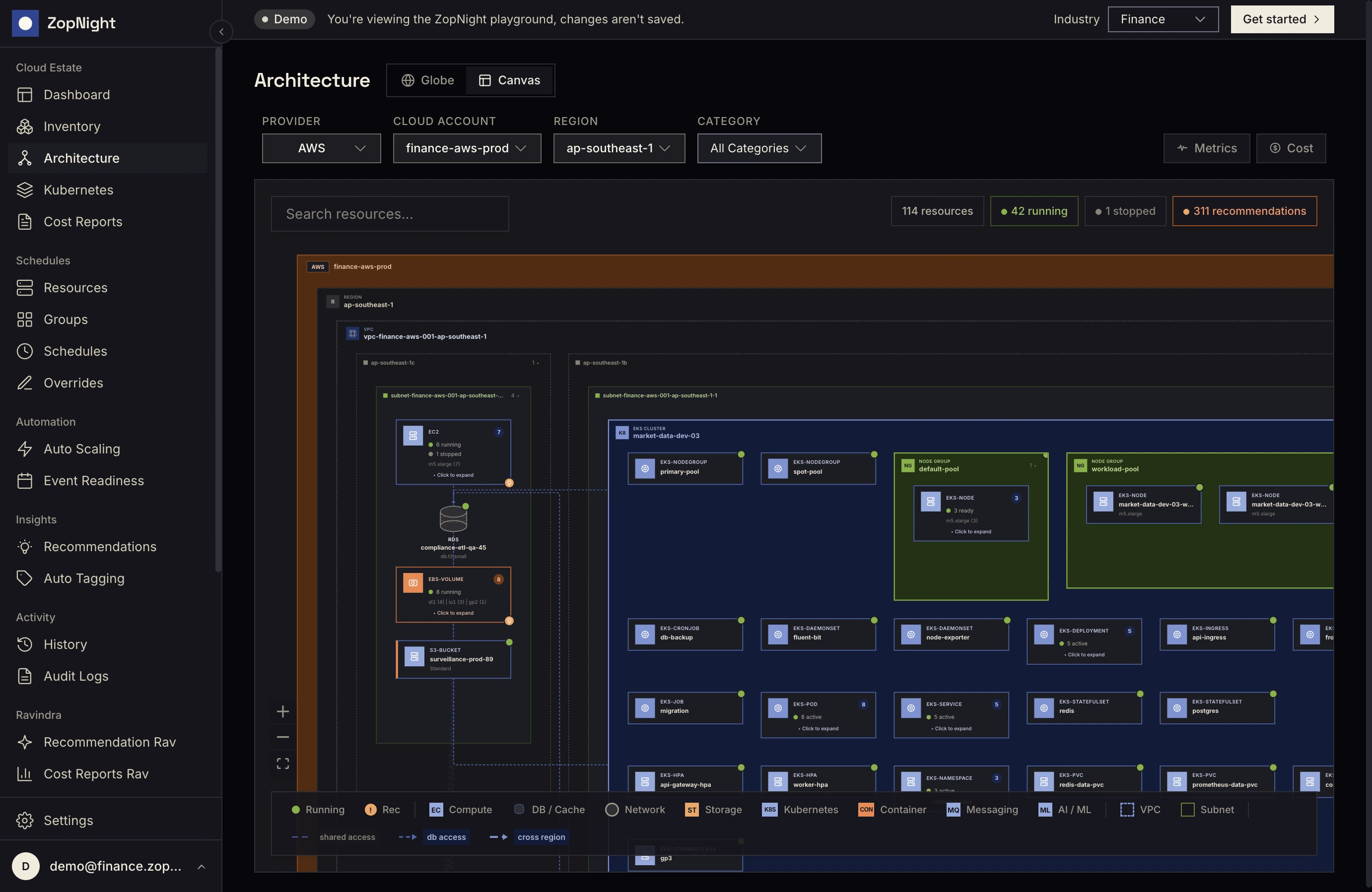
The architecture canvas.
Every resource, every dependency, mapped.
Architecture canvas view. Filter by provider and region. Click any resource to drill into its config + cost. (Live product includes Globe view, account / category filters, and the full inventory grid.)
PROBLEM
Cloud spend grew.
Cloud governance didn’t.
Three clouds. Eight dashboards. Thirty-plus engineering hours a week on manual start-stop and tag work nobody trusts. The waste isn’t dramatic, it’s quiet, distributed, and continuous.
- Non-prod running 24/7 Used 50 hours. Billed for 168.
- Orphan resources Detached disks, stale snapshots, unattached IPs.
- Over-provisioned production t3.xlarge at 8% CPU. The team that picked it left.
- Unclaimed rate optimisation Hybrid Benefit, RIs, Savings Plans untouched.
- Compliance drift IAM, encryption, public-access misconfigs.
Detect. Decide. Act. — Every dollar your cloud advisor missed.
Continuous detection across AWS, GCP, and Azure. Every finding reconciled against your live bill. Auto-fix where it’s safe; guided remediation for everything else. Customer databases excluded by default.
SOLUTION
Three engines.
One workspace.
Lens reads your bill and finds the waste. Smart Scheduling captures non-prod cycles. Tide sizes production to actual demand. CDCR keeps it all fixed.
Recommendations
Finds the waste.
450+ rules across AWS, GCP, Azure. Eight categories — idle, right-sizing, schedule, orphan, compliance, discount, security, reliability. Every finding ships with the metric, the threshold, the action, and the dollar. No black-box ML.
Smart Scheduling
Captures non-prod cycles.
Cron-based, dependency-aware, per-timezone. 30+ resource types — VMs, K8s, SQL, Databricks. Storage wakes before compute. Production-safe overrides.
Smart Autoscaling by Tide
Sizes for the moment, not the peak.
ASGs, scale sets, AKS pools. 30–40% compute reduction on eligible workloads. Three modes — monitor → recommend → autopilot. You decide where it gets the keys.
DEPTH
The depth behind
the three engines.
Nine more features you’d otherwise build internally — reports, showback, tagging, inventory, budgets, ownership, AI-native access, audited remediation, the cross-cloud map. All ship inside the same workspace, on the same audit trail.
Boardroom-ready cost reports.
Three Reports tabs — Organisation, Teams, Tags. Cost Flow Sankey, four columns deep. Cost anomaly detection across five dimensions. Four dashboard presets — Executive, Engineering, FinOps, All Widgets.
ORG · TEAMS · TAGS
Every dollar, attributed.
Two attribution dimensions — team and tag. Shared resources split equally across owning teams. Reconciled to actual billing (Cost Explorer, Cost Management, BigQuery), not rack rate.
TEAM · TAG · RECONCILED
Tag every resource, without the ticket.
Predicts environment and stop-eligibility on every untagged resource. Rule-based — naming patterns, existing tags, instance config. We replaced ML with rules in production. Accept, reject, sync back to AWS / GCP / Azure.
PREDICT · ACCEPT · SYNC
Search, filter, act on every resource — three levels deep.
380+ resource types across AWS, GCP, Azure. Grouped account dropdown, cascade filters, nine type categories. Parent-child nesting (cluster → nodepool → VM). Bulk start / stop with a sticky selection banner.
380+ TYPES · 9 CATEGORIES · 3 LEVELS
Budgets that compute themselves.
Budget per team, per resource group, or per resource. Spend computed live from your actual cost records. Status colour-coded: green, yellow, red. Threshold-crossing alerts fire to the team’s channel.
GREEN · YELLOW · RED
Who created this? Already answered.
Daily identity-sync derives the IAM principal that originally created each resource — from CloudTrail, GCP Audit Logs, Azure Activity Logs. Human callers separated from service accounts. The “who owns this orphan disk?” question, finally answered.
CREATOR · LAST WRITE · HUMAN VS SERVICE
Your cloud, in your AI editor.
A Model Context Protocol server with 43 read-only tools — resources, schedules, costs, recommendations, teams, budgets, audit logs. Connect Claude Desktop, Cursor, Codex, or Claude Code with one PAT. Read-only by default; writes rejected at the protocol layer.
AI-NATIVE · 43 TOOLS · READ-ONLY
Certified rules. One click. Zero database touches.
One click applies certified recommendations. A four-step check runs every time — precondition → approval → cloud action → validate. Customer databases stay with your DBA team: RDS, Aurora, Cloud SQL, ElastiCache, Azure SQL, Postgres, MySQL — never touched.
CERTIFIED · DBS UNTOUCHED
Map every cloud. Trace every dependency. Automatically.
Atlas — searchable inventory of 380+ resource types across AWS, GCP, Azure. Canvas — interactive dependency graph, live edges auto-derived from cloud metadata. Subnet swimlanes, security-group hubs, VPC peering, attached storage. The map maintains itself.
ATLAS · CANVAS · LIVE
The fix that stays fixed.
CI/CD made code continuous. CDCR makes your cloud continuous. So the fix stays fixed.
01
DETECT
Detect, continuously.
Drift, cost anomalies, expired overrides, compliance gaps continuously, across every cluster, account, and region.
02
CLASSIFY
Classify, by impact.
450+ rules across AWS, GCP, Azure. Every finding scored by severity and dollar impact production drift ranks above an idle dev box.
03
REMEDIATE
Remediate, continuously.
Every action in the audit trail actor, timestamp, dollar delta. Reviews read measured outcomes, never forecasts.
04
VERIFY
Verify, every action.
Auto-fix where it’s safe guided remediation for the rest. Production writes admin-gated, customer databases never touched.
ACTIVE
$14,820/month recovered in 4 weeks.
Production untouched.
Anonymised Fortune 1000 estate. 2,140 resources across 3 Azure subscriptions. Read-only connect, then four weeks, line-by-line, reconciled against actual billing.


We find. We execute. We prove.
| Azure Advisor | CloudHealth | Flexera | Spot.io | zopnight | |
|---|---|---|---|---|---|
| Azure rules | 15 | ~50 | ~90 | - | 147 |
| Multi-cloud (AWS + GCP + Azure) | - | ✓ | ✓ | ✓ | ✓ |
| Cron scheduler | - | - | partial | - | ✓ |
| Dependency sequencing | - | - | - | - | ✓ |
| Autoscale on prod | - | - | - | partial | ✓ |
| Continuous remediation (CDCR) | - | - | - | partial | ✓ |
| Automated execution | - | - | - | partial | ✓ |
| Kubernetes + Databricks | - | partial | partial | partial | ✓ |
| India residency | - | - | - | - | ✓ |
* AWS Trusted Advisor and GCP Recommender exhibit the same 14%-only pattern as Azure Advisor.
Outcome-aligned pricing.
Pay when the bill drops.
| Plan | Free | Team | Growth | Enterprise |
|---|---|---|---|---|
| Best for | Audit your cloud, read-only | Up to $50K/mo cloud spend | Up to $500K/mo cloud spend | Custom + outcome share |
| Tailored Recommendations | ✓ all 450+ rules | ✓ | ✓ | ✓ |
| Sequenced Scheduling | - | ✓ | ✓ | ✓ |
| Autoscaling engine | - | - | ✓ | ✓ |
| CDCR auto-remediation (safe) | - | - | ✓ | ✓ |
| CDCR guided remediation + audit forwarding | - | - | - | ✓ |
| MCP server (Claude / Cursor) | ✓ | ✓ | ✓ | ✓ |
| Multi-cloud (AWS + GCP + Azure) | 1 cloud | ✓ | ✓ | ✓ |
| India residency / VPC deploy | - | - | - | ✓ |
| SAML SSO, RBAC, SOC 2 pack | - | - | ✓ | ✓ |
| Pricing | $0 | $199/mo* | $799/mo* | Platform fee + % of realised outcomes |
| Connect a cloud → | Start trial → | Start trial → | Talk to platform sales → |
No outcomes, no charge on the variable. Verified against your actual AWS / GCP / Azure billing.
Built for every seat in the room.
Predictable variance. Verified against your bill.
stops the Friday "why is the bill up" meeting.
One platform. Three clouds. Four lifecycle stages.
stops the six-tool stack that doesn't talk.
Ship product, not platform overhead.
stops the platform project "almost done" since Q1.
Cross-cloud inventory. CDCR auto-fix.
stops 3 AM pages from dashboard ↔ ticket gaps.
Read-only by default. Append-only audit.
stops "yet another vendor with broad write access."
How much is your cloud wasting right now?
Most teams overspend by 30–60%. Find out your number in 30 seconds.
zopnight · ET–42 · SAVINGS
SELECT CLOUD PROVIDER
Get your savings summary
Enter your details to receive your savings estimate by email.
Things teams ask before they sign.
Will zopnight ever touch production?
Not until you say so. zopnight runs read-only by default, every write operation rejected at the credential layer. To enable writes, you opt in per environment, scope the IAM policy, and tag the resources eligible. The audit trail captures every approval. Most customers run six to twelve weeks read-only before flipping the first scope.
What permissions does zopnight need?
Read-only roles on AWS, GCP, or Azure, full IAM policy published in the docs. No service accounts created in your tenant; no agents installed; no proxy in the data path. For optional auto-remediation, a scoped write policy (also published) covers only the resource types enabled in the override settings.
What happens during an incident?
All scheduled actions pause. zopnight stops issuing writes the moment a registered incident channel signals an open incident, Slack, Teams, GChat, webhook. Resume is one click; the audit trail records the pause and the resume.
How is this different from native AWS / GCP / Azure scheduling?
Native schedulers are single-cloud, single-resource-type, and operator-defined. zopnight is multi-cloud, dependency-aware, and rule-derived. The cron syntax is the surface; underneath, the engine knows storage wakes before compute, knows that an EKS scale-down waits for the StatefulSet quiesce, knows the override expires Friday.
How long until the bill drops?
First findings in five minutes. First safe auto-fix windows in week one. Measurable bill movement by end of week four, the Fortune 1000 case study above ($14,820/mo recovered in 4 weeks) is the documented pattern, not the ceiling.
Is there a free tier?
Yes. The Free plan covers all 450+ recommendation rules on one cloud, read-only, with the MCP server included. No credit card. The pilot runs 30 days; after that, you stay on Free or upgrade, no auto-bill, no surprise charge.